How to Accept YouTube's New Partner Program Terms Before January 31, 2027
Most of the talk about YouTube's 2027 changes is about the higher bar for new channels. But there is a second change that affects every channel that is already monetized: updated Partner Program terms that you have to accept by January 31, 2027. Miss it, and some of your earnings stop on February 1. Here is what to accept, where to find it and what else changes for existing partners.
What YouTube announced
In August 2026 YouTube announced a set of Partner Program updates that start on February 1, 2027. For existing partners, the parts that matter are the new terms, a new definition of an active channel, and a new view threshold for Shorts earnings.
| Change | Who it affects | What you need to do |
|---|---|---|
| Updated module terms | All channels already in YPP | Accept in YouTube Studio by Jan 31, 2027 |
| Higher entry bar (8,000 hours or 20M Shorts views) | New applicants only | Nothing, if you are already monetized |
| Active channel rules | All YPP channels | Keep a minimum level of uploads or views |
| 10M Shorts views for Creator Pool | Channels earning from Shorts | Reach 10M Shorts views in 90 days to earn from Shorts that month |
Source: YouTube's August 2026 announcement and YouTube Help. Always check YouTube Studio for the wording on your own channel.
Which terms you need to accept
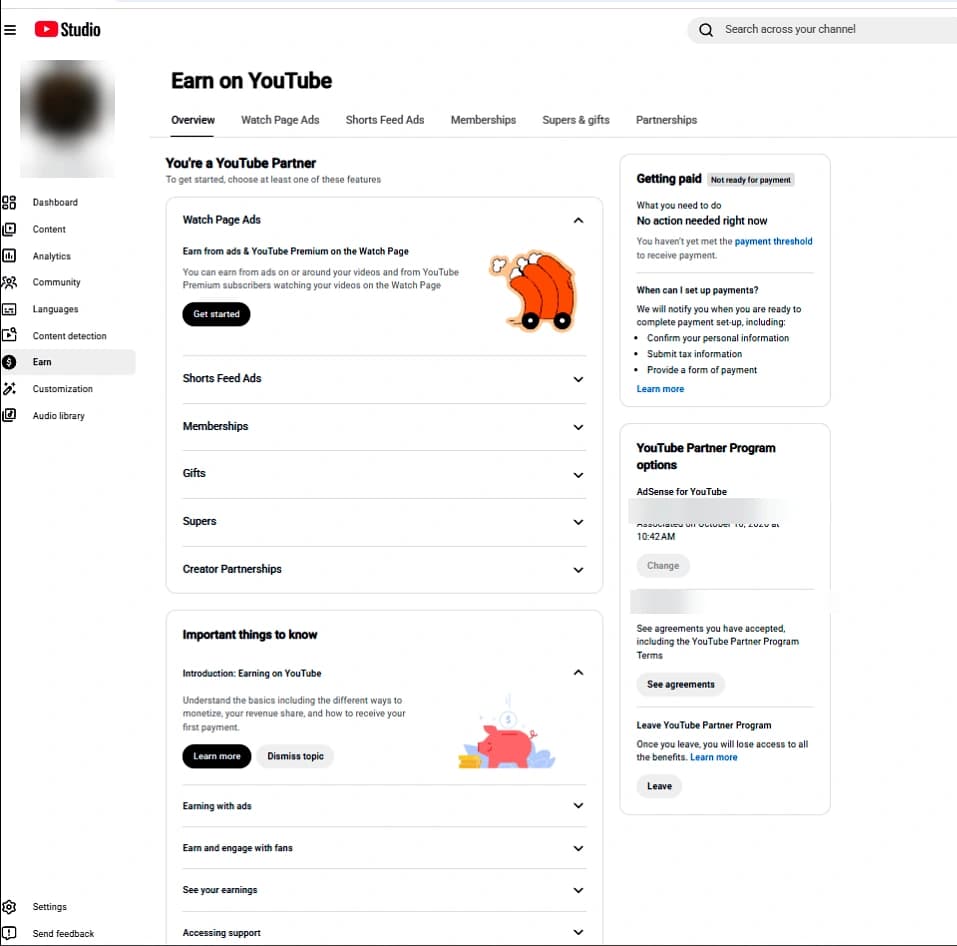
YouTube's monetization terms are split into modules. You only see the modules your channel uses. The updated ones are:
- Watch Page Monetization Module: ads on long videos and YouTube Premium revenue from them.
- Shorts Monetization Module: your share of the Shorts ad revenue pool.
- Commerce Product Module: memberships, Super Chat, Super Thanks and similar features, where your channel uses them.
How to accept the new terms (step by step)
- Sign in to YouTube Studio on a computer with the account that owns the channel. Managers and editors may not see the option.
- Click Earn in the left menu.
- Look for the notice about updated terms at the top of the page, or open the agreements section for each module.
- Read the updated terms for each module listed and accept them. Repeat for every module you use.
- Refresh the Earn page and check that no module still shows a pending agreement.
- If you manage more than one channel, repeat this on each one. Terms are accepted per channel.
What happens if you miss January 31, 2027
Your channel is not removed from the Partner Program. What stops is the money from any module you have not accepted. From February 1, 2027 those features stop earning, and they start again once you accept the terms. Earnings lost in the meantime are not paid back, so every day of delay costs you.
The new active channel rules
From February 1, 2027 YouTube also checks whether a monetized channel is still active. Your channel counts as active if it meets at least one of these:
- 1,000 public watch hours in the last 365 days, or
- 1 million public Shorts views in the last 90 days, or
- two long-form uploads or five Shorts uploads every 90 days.
If a channel falls below all three, YouTube gives it a 90-day window to recover by reaching 1,000 watch hours in 365 days or 1 million Shorts views in 90 days. The easiest way to stay safe is simply to keep uploading on a regular schedule.
The 10 million Shorts views rule
From February 1, 2027, a channel needs 10 million public Shorts views in the past 90 days to earn from the Shorts Creator Pool that month. Below that, the channel stays monetized and long-form videos keep earning, but Shorts revenue pauses until views are back above 10 million. If most of your income comes from Shorts, this is the change to plan for.
Checklist before January 31, 2027
- Accept every updated module in YouTube Studio > Earn.
- Check that your AdSense account is linked and verified, with payment details up to date.
- Confirm you are the channel owner, not only a manager.
- Plan at least two long videos or five Shorts every 90 days.
- If you rely on Shorts income, check your 90-day Shorts views against the 10 million mark in Analytics.
Not monetized yet?
If your channel is not in the Partner Program yet, the bar doubles for new applicants on February 1, 2027: 1,000 subscribers plus 8,000 watch hours or 20 million Shorts views. Check how close you are with our free YouTube monetization checker, and read the full breakdown in our YouTube Partner Program requirements guide.
Do I lose monetization if I don't accept the new YouTube terms?
No. Your channel stays in the YouTube Partner Program. Earnings from any module you have not accepted pause from February 1, 2027, and start again after you accept.
Where do I accept the new YouTube Partner Program terms?
In YouTube Studio, under Earn. Each module you use (Watch Page, Shorts, Commerce Product) has its own agreement to review and accept.
Does the 8,000 watch hours rule apply to channels already monetized?
No. The 8,000 watch hours or 20 million Shorts views requirement is for new applicants from February 1, 2027. Channels already in the program keep their status.
What counts as an active YouTube channel from 2027?
At least one of: 1,000 public watch hours in the last 365 days, 1 million public Shorts views in the last 90 days, or two long-form or five Shorts uploads every 90 days.
Do I need 10 million Shorts views to stay monetized?
No. You need 10 million Shorts views in 90 days only to earn from the Shorts Creator Pool that month. Below that, the channel stays monetized and long-form videos keep earning.