YouTube Channel Demonetized? Why It Happens and How to Fix It (2026)
Opening YouTube Studio and seeing that monetization is off is a horrible feeling, especially after months of work to reach 1,000 subscribers and 4,000 watch hours. The good news: in many cases you can find out exactly why it happened, appeal, and get back in. Here is what "demonetized" really means, the most common reasons, and a clear step-by-step plan.
Demonetized video vs demonetized channel
People use "demonetized" for two very different things, and the fix depends on which one you have.
| Single video (yellow icon) | Whole channel (YPP suspended) | |
|---|---|---|
| What you see | A yellow $ icon on one or a few videos | Monetization turned off for the channel, email from YouTube |
| Still in YPP? | Yes | No |
| Usual cause | Content not advertiser-friendly | Channel breaks a monetization policy, or long inactivity |
| What to do | Request a human review on that video | Appeal within 21 days, or reapply after 90 days |
The most common reasons YouTube removes monetization
- Reused or mass-produced content. Channels that mostly re-upload other people's clips, compilations or template videos with little original value are the most common case YouTube flags under its inauthentic content rules.
- Breaking the YouTube channel monetization policies. These include the Community Guidelines, copyright rules, advertiser-friendly guidelines and the AdSense program policies. YouTube says channels lose monetization when they break any of them, no matter how many views they have.
- Invalid traffic. Bought views, bot traffic or click schemes can get the AdSense account or channel removed.
- Inactivity. YouTube says it can remove monetization from a channel that has not uploaded or posted for six months or more.
- Copyright problems. Repeated copyright claims and strikes on monetized videos are a red flag in reviews.
Note: according to YouTube, current YPP members are not removed just for receiving a Community Guidelines strike. But strikes do show reviewers how a channel behaves, so they still matter.
Step 1: find out exactly what happened
- Check the email address linked to your channel. YouTube sends an email that names the policy, for example reused content.
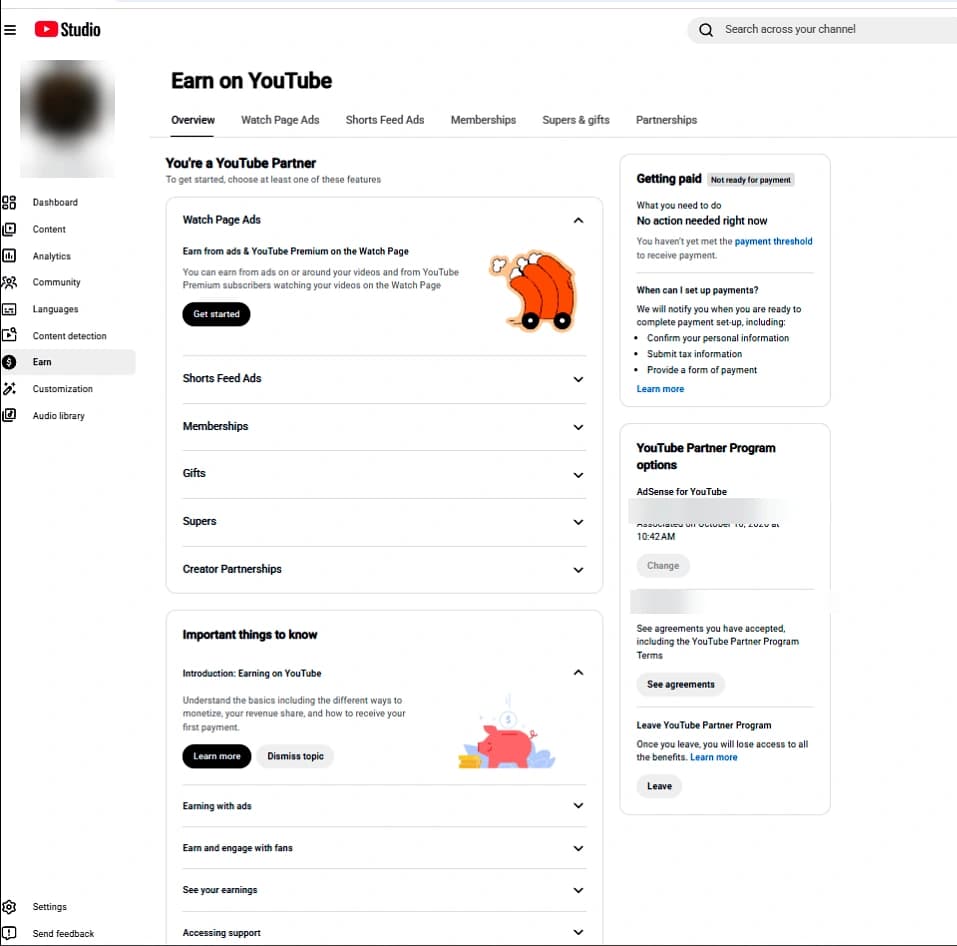
- Open YouTube Studio > Earn. It shows your current YPP status and, after a suspension, the appeal option.
- If only some videos are affected, open YouTube Studio > Content and look at the monetization column for the yellow icons.
Step 2: fix the problem before you appeal
An appeal only works if the channel now clearly follows the rules. Before you appeal, remove or make private the videos that caused the problem (for example re-uploads, other people's clips or videos with copyright claims), and make sure the videos left on the channel show your own voice, editing, commentary or ideas.
Step 3: appeal within 21 days
- Go to YouTube Studio > Earn and choose to appeal.
- Record a video appeal: it must be unlisted, video only, less than 5 minutes long and uploaded to the channel you are appealing. Show your channel URL in the first 30 seconds.
- In the video, show how you make your content: your scripts, recording, editing timeline and what makes it original. Point to the policy you were flagged for and explain what you changed.
- Or appeal through Creator Support in YouTube Studio if that option is shown for your channel.
- Wait for the decision. YouTube says it usually replies within 14 days.
Step 4: if the appeal fails, reapply after 90 days
If YouTube rejects the appeal, you can apply again 90 days after the suspension date. Use that time well: upload consistently, keep everything original and make sure you still meet the thresholds when you reapply (1,000 subscribers plus 4,000 public watch hours in 12 months, or 10 million Shorts views in 90 days).
How to stop it happening again
- Keep every upload clearly your own: your script, your voice or commentary, your edit.
- Do not buy views, subscribers or watch hours. It breaks YouTube's fake engagement policy and can cost you the channel.
- Check music and clips before you publish, and fix copyright claims quickly.
- Stay active. Upload or post at least every few months, and from 2027 follow the new activity rules.
- Read every email YouTube sends you. Warnings usually come before bigger action.
What if you bought a monetized channel?
The same rules apply to a channel you bought. That is why it matters who you buy from. With us, every monetized channel is delivered with 30 days of support and a 30-day replacement or refund. If monetization is removed while you are working on the channel, we guide you through fixing it and appealing. If it is removed without you having done anything on the channel, we replace the channel or refund you.
How long do I have to appeal a YouTube demonetization?
If your channel was suspended from the YouTube Partner Program, you have 21 days from the suspension to appeal. If a suspension is only scheduled, you can appeal before the scheduled date.
How long does a YPP appeal take?
YouTube says it usually makes a decision within 14 days.
When can I reapply after being demonetized?
You can reapply 90 days after your suspension or application rejection date.
Can a demonetized channel get monetized again?
Yes. Many channels get back in after fixing the problem, either through a successful appeal or by reapplying after 90 days with original content.
Why is only one of my videos demonetized?
A yellow icon on one video means that video is not suitable for most advertisers. Your channel is still in the YouTube Partner Program. You can edit the video or request a human review.