Buying a YouTube Channel in 2026: Safe Buyer's Guide, Cost and Checks
Getting into the YouTube Partner Program can take a new channel a year or more, and from 1 February 2027 the bar doubles for new applicants. That is why more creators look at buying a channel that is already monetized. Done carefully, it saves months. Done carelessly, it is an easy way to lose money. This guide shows you what to check, what to avoid and how the handover works, step by step.
Types of YouTube channels you can buy
| Channel type | What you get | Can it earn right away? |
|---|---|---|
| Aged channel | An older channel with history but little or no audience | No, it still needs 1,000 subscribers and watch hours |
| Channel with subscribers | An existing audience, but not in the Partner Program yet | No, unless it already meets the requirements |
| Monetized channel | Partner Program approved, ads turned on | Yes, from the first new upload |
How much does it cost to buy a YouTube channel?
There is no fixed price. Sellers price a channel on whether it is monetized, how many real subscribers it has, where the audience lives, its watch time and its niche. A monetized channel with a US, UK and European audience costs more than one with mostly South Asian viewers, because the same views pay several times more.
| On Instant Monetized | Price |
|---|---|
| Aged YouTube channel (Standard / Premium) | $24.99 / $34.99 |
| Monetized channel, Asian and worldwide audience | $399.99 |
| Monetized channel, US, UK and Europe audience | $499.99 |
Prices on the day this guide was updated. Very cheap monetized channels elsewhere are often built on bought subscribers or watch hours.
Where to buy YouTube channels
| Where | Good | Watch out for |
|---|---|---|
| Open marketplaces and forums | Lots of listings | No checks on sellers, scams and fake stats |
| Private sellers on social media | Sometimes cheap | No refund, no proof, no support |
| Specialist sellers with a website | Proof, support and a return policy | Read the policy and check the proof is real |
Is buying a YouTube channel allowed?
YouTube lets the owner of a Brand Account channel add other people and transfer primary ownership to them, and that is the feature a real handover uses. At the same time, YouTube does not officially support buying and selling channels, and it can review, limit or demonetize any channel that breaks its policies, whoever owns it. Go in knowing that risk, and reduce it by buying a channel that was built the clean way.
Why buy a monetized channel at all?
- You earn from your first upload instead of waiting for 1,000 subscribers and 4,000 watch hours (8,000 hours from February 2027).
- You skip the period where views earn nothing.
- It makes sense if you already have content, a niche or editing skills, and the missing piece is monetization.
- It makes less sense if you have never posted a video: a channel does not earn without new uploads.
8 checks before you pay
- Monetization status: in YouTube Studio, the Earn tab should say the channel is in the YouTube Partner Program. Ask for a live screen share or a fresh screenshot with today's date.
- Traffic sources: in Analytics, most views should come from Browse, Suggested and Search. A big share of External or unknown traffic can mean paid or bot views.
- Growth curve: subscribers and views should grow steadily. A spike of thousands of subscribers in one day with no viral video is a warning sign.
- Engagement: real channels have comments, likes and a sensible watch time. 50,000 subscribers and 3 comments per video does not add up.
- Strikes and warnings: ask to see the channel status page in Studio. You want no Community Guidelines strikes and no copyright strikes.
- Content: the videos should be original. Reused clips, re-uploads and low-effort AI slideshows can be demonetized under YouTube's inauthentic content rules.
- Audience country: check where viewers live in Analytics. The same views pay several times more from the US or UK than from South Asia.
- Ownership: confirm the channel is a Brand Account that can be transferred to your Google account, not a personal account that only works with the seller's login.
Red flags: walk away if you see these
- The seller will not show live Studio data, only old screenshots.
- Subscribers or watch hours were bought, or the seller calls them boosted.
- They only give you an email and password instead of transferring ownership.
- Payment only by gift cards or untraceable methods, with no refund policy.
- Promises of guaranteed monthly income.
- A price far below every other seller for a large, monetized channel.
How the ownership transfer works
- You give the seller the Google account email you want the channel on. Use one you control, with your own phone number and recovery email.
- The seller adds you as an owner of the channel's Brand Account.
- YouTube makes new owners wait 7 days before they can become the primary owner. This is normal and protects channels from hijacking.
- After the waiting period, the seller makes you the primary owner and removes their own access.
- You link your own AdSense account in YouTube Studio, so the earnings go to you.
Each person can only have one AdSense account. If you already have one, link that one. If not, you create it during the AdSense step in Studio.
Protect your money
- Buy from a seller with a written refund or return policy, and read it before you pay.
- Check that the seller shows real proof from channels they delivered, not stock images.
- Keep every message, screenshot and payment receipt until the transfer is complete.
- Do not share your own Google password. A proper transfer never needs it.
Your first week after the transfer
- Change the recovery email and phone, turn on 2-step verification, and check who else still has access.
- Link your AdSense account and check the payment details.
- Keep the channel's niche. A sudden switch confuses viewers and the algorithm.
- Upload regularly. A monetized channel that stops posting slowly loses views and income.
- Follow YouTube's policies closely: original content, no misleading titles, no reused clips.
How Instant Monetized handles it
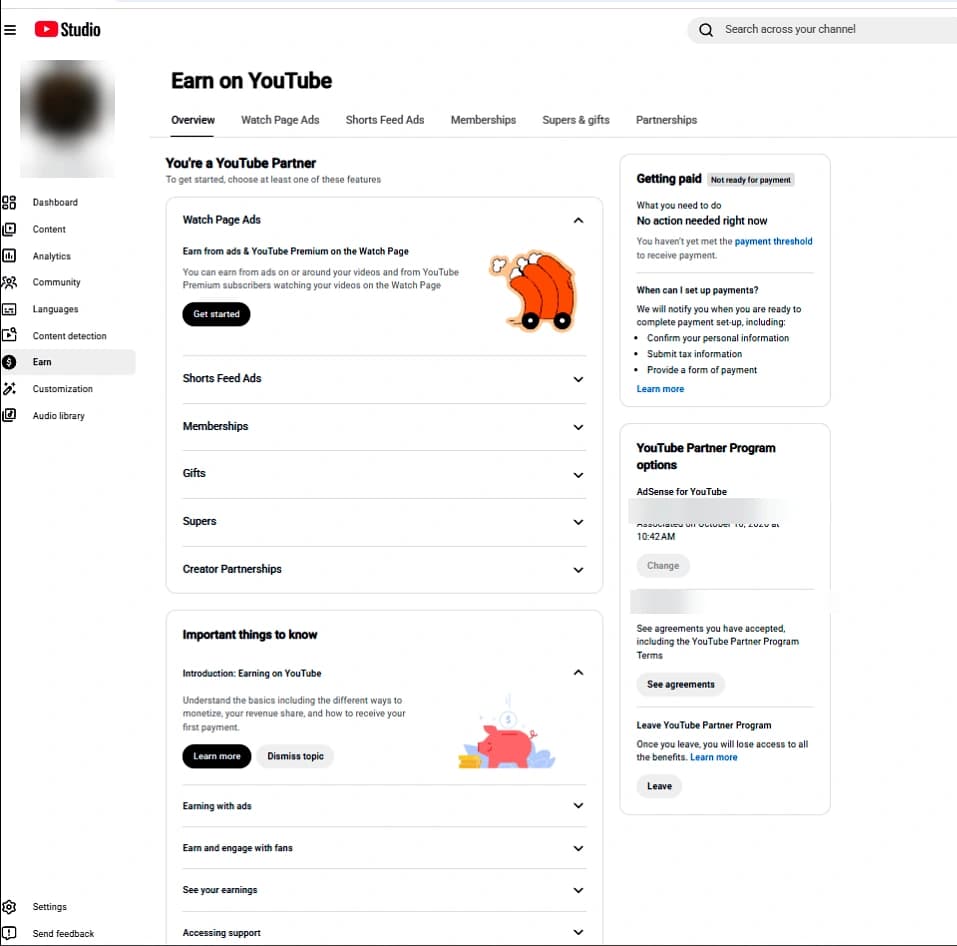
We grow our channels organically with original content until YouTube approves them for monetization, and we show real YouTube Studio screenshots from channels we have delivered. After payment you get the account details and step-by-step transfer instructions within 12 to 24 hours. Every order comes with a 30-day replacement or refund and 30 days of support, and we help you through the ownership transfer and setup. We do not promise earnings, because income depends on what you post.
FAQ
How much does a monetized YouTube channel cost?
It depends on the audience country, subscribers, watch time and niche. On Instant Monetized, monetized channels start at $399.99, and channels with a US, UK and Europe audience are $499.99.
Can a bought channel lose monetization?
Yes. YouTube reviews channels regularly, and breaking its policies after the transfer can lead to demonetization. Original content keeps you safe.
Do I need my own AdSense account?
Yes. You link your own AdSense so the money is paid to you.
How long does the transfer take?
The seller can add you right away, but YouTube's 7-day wait applies before you become the primary owner.
Can I change the channel name?
Yes, but keep the niche. Big changes can drop views for a while.
Is it better to buy an aged or a monetized YouTube channel?
An aged channel is cheap but still has to reach the Partner Program requirements. A monetized channel costs more but can earn from your first upload.
Is it better to grow my own channel?
If you have time, yes. If you want to earn now, a monetized channel can save months.