How to Check if a YouTube Channel Is Monetized (Yours or Any Channel)
Whether you are waiting for approval, checking that your videos still earn, or about to buy a channel, you need to know one thing: is this channel actually monetized? For your own channel YouTube shows it clearly. For someone else's channel there is no official badge, but there are reliable signs. Here is how to check both.
Check your own channel: the YouTube Studio Earn tab
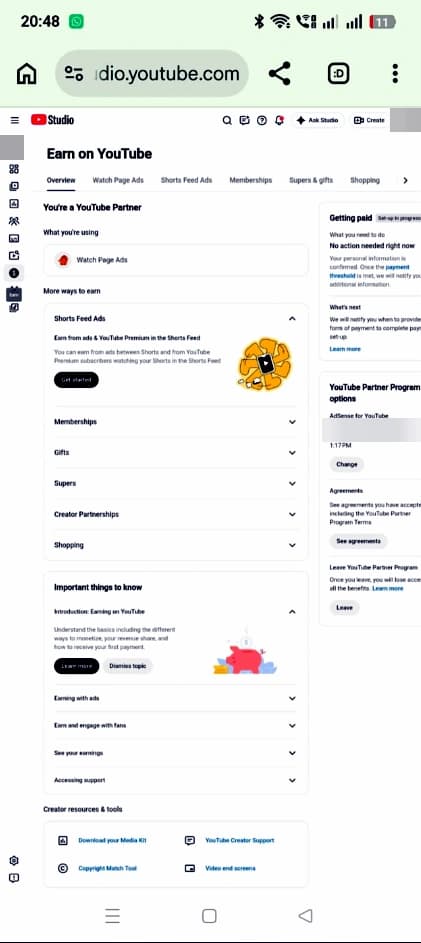
- Go to studio.youtube.com (or open the YouTube Studio app).
- Click Earn in the left menu. Older guides call it the Monetization tab; it is the same page.
- Read the top of the page. A monetized channel sees that it is in the YouTube Partner Program, with tabs such as Ads, Memberships, Shopping and Supers.
- If you are not in yet, the page shows your progress bars for subscribers, public watch hours or Shorts views, and an Apply button once you qualify.
| What the Earn tab shows | What it means |
|---|---|
| Progress bars and "Get notified" | Not eligible yet. Keep growing until every bar is full. |
| Apply / Start | You qualify. Accept the terms, link AdSense, and submit. |
| In review | YouTube is reviewing the channel, which usually takes about a month. |
| You're in the Partner Program, with Ads, Memberships and other tabs | Monetized. Turn on ads for your videos. |
| Not approved / reapply date | Rejected for now. You can usually reapply after 30 days, or 90 days after a repeat rejection. |
Check each video: the dollar icons
Being in the program does not mean every video earns. In YouTube Studio, open Content and look at the Monetization column next to each video:
- Green dollar sign: ads are on and the video is fully monetized.
- Yellow dollar sign: limited or no ads, usually because the video is not fully advertiser-friendly. You can request a human review.
- Grey or crossed-out dollar sign: monetization is off for that video, or it has a copyright claim that sends revenue elsewhere.
Check another creator's channel
YouTube does not show a public "monetized" badge. These are the signs that a channel is in the YouTube Partner Program, from most to least reliable:
| Sign | Proves YPP? | Why |
|---|---|---|
| Join button (channel memberships) | Yes | Memberships are only available to Partner Program channels. |
| Thanks button under videos (Super Thanks) | Yes | Super Thanks is a Partner Program feature. |
| Store tab or products under videos (YouTube Shopping) | Usually | Shopping is a Partner Program feature, but some merch partners can look similar. |
| Ads playing on their videos | No | Since 2021 YouTube can show ads on channels that are not in the program, and it keeps that money. |
| "Is monetized" page-source tricks and browser extensions | No | YouTube changed its page code; these tricks and many tools now guess. |
A Join or Thanks button can also appear on channels in the lower Partner Program tier (500 subscribers), which unlocks fan funding but not ad revenue.
Buying a channel? How to verify monetization properly
- Ask for a live screen share of YouTube Studio, then Earn, then the Analytics Revenue tab. Screenshots are easy to edit.
- Check the Content tab for green dollar icons on recent videos, not only old ones.
- Ask to see the AdSense payment history linked to the channel.
- Check for Community Guidelines strikes and copyright claims in YouTube Studio.
- From 1 February 2027 monetized channels must also stay active, so check the upload history too.
- Only pay when ownership is moved to your own Google account.
Why a monetized channel can lose monetization
- Reused or repetitive content, which YouTube calls inauthentic content.
- Community Guidelines strikes or copyright problems.
- From February 2027: being inactive (fewer than 1,000 watch hours in 365 days, 1 million Shorts views in 90 days, or 2 long videos or 5 Shorts every 90 days).
- An AdSense account that is disabled or not in good standing.
FAQ
How can I tell if a YouTube channel is monetized?
For your own channel, open YouTube Studio and click Earn. For another channel, look for a Join button, a Thanks button or YouTube Shopping. Ads alone do not prove a channel is monetized.
Where is the Monetization tab in YouTube Studio?
It is now called Earn and sits in the left menu of YouTube Studio. It shows your Partner Program status, eligibility progress and earning tabs.
Do ads on a video mean the channel is monetized?
No. YouTube can run ads on channels outside the Partner Program and keep the revenue, so ads are not proof.
What does a yellow dollar sign mean on YouTube?
The video shows limited or no ads because it may not be suitable for all advertisers. You can request a review in YouTube Studio.
How long does monetization review take?
Usually about a month after you apply, sometimes longer when many channels apply at once.