YouTube AI Disclosure Rules: Can You Monetize AI Videos in 2026?
AI tools now write scripts, generate voices and create whole video clips. That raises two questions every creator asks: do I have to tell YouTube I used AI, and can these videos still make money? The short answer is that disclosure and monetization are two separate checks. This guide explains both, so you know exactly what to tick in YouTube Studio and what keeps a channel monetized.
What YouTube's AI disclosure rule says
YouTube asks creators to label content that is "altered or synthetic" when it looks realistic. The idea is simple: viewers should know when something that looks real did not actually happen.
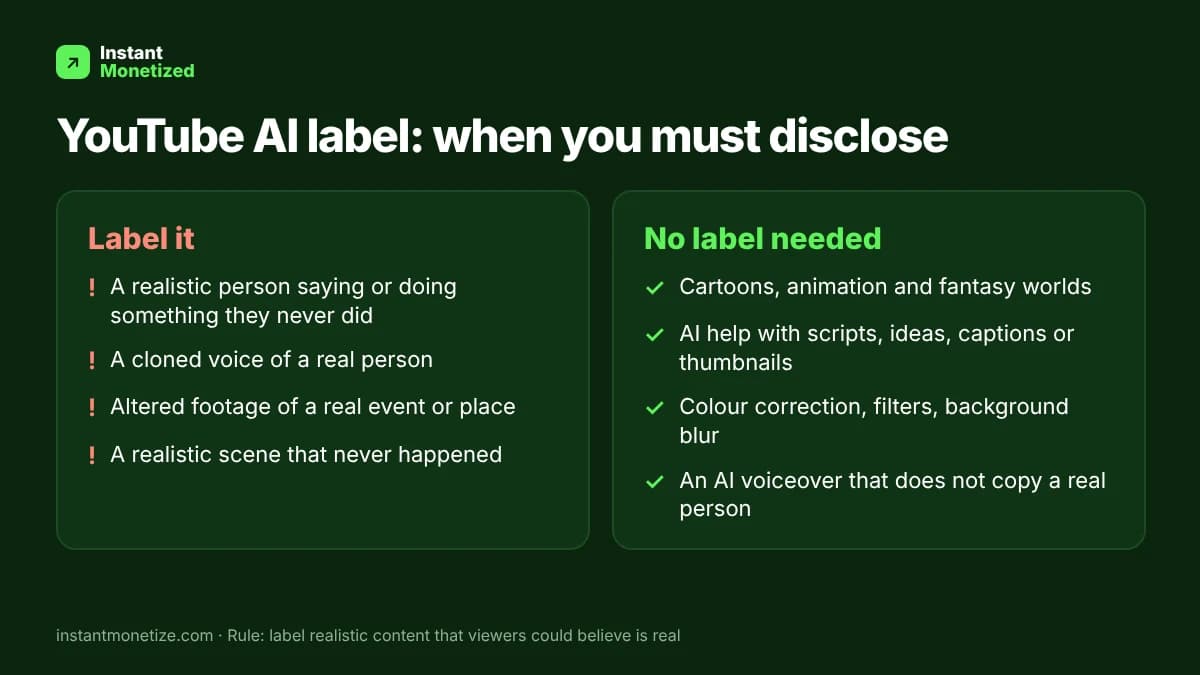
When you must disclose
- A realistic person saying or doing something they never said or did, including a cloned voice of a real person.
- Altered footage of a real event or place, for example a real city shown flooding when it did not.
- A realistic scene that never happened, presented in a way viewers could believe is real.
When you do not need to disclose
- Clearly unrealistic content: animation, cartoons, fantasy worlds, obvious special effects.
- AI used for production help: writing scripts, generating ideas, captions, translations or thumbnails.
- Minor edits such as colour correction, background blur, beauty filters or noise removal.
- An AI voiceover that is not imitating a real person.
How to add the AI label in YouTube Studio
- Upload your video, or open an existing one in YouTube Studio under Content.
- On the Details page, find the "Altered content" question.
- Choose Yes if the video contains realistic altered or synthetic content, otherwise choose No.
- Save. YouTube adds a label in the expanded description, and on sensitive topics it may show a more visible label on the video itself.
YouTube can also add a label itself when it detects realistic AI content. Creators who repeatedly fail to disclose can face penalties, including content removal or suspension from the YouTube Partner Program.
Can AI videos be monetized?
Yes. YouTube does not ban AI content from the Partner Program. It judges the whole channel against its monetization policies. In July 2025 YouTube renamed its "repetitious content" policy to "inauthentic content", and that policy is the one AI channels usually run into.
- Usually fine: AI-assisted videos with your own idea, script, structure, commentary or editing, where each upload is clearly different.
- Risky: hundreds of near-identical videos from one template, AI voices reading copied text over stock clips, slideshows with no added value.
- Not allowed: re-uploading other people's content with an AI voice, or misleading deepfakes.
Can you monetize Sora and other AI video clips on YouTube Shorts?
You can upload clips made with Sora, Veo, Kling or similar tools, and they can earn as Shorts, as long as you have the rights to use them under that tool's terms and the channel follows the same rules as any other channel. Realistic clips need the altered content label. A channel that only posts raw AI clips one after another, with no story, editing or commentary, is the kind YouTube treats as inauthentic content.
- Add something of your own: a narrative, a series, a format, commentary or real editing.
- Disclose realistic clips, especially anything showing real people or real events.
- Avoid watermark-covered or copied clips from other creators.
A simple checklist before you upload
- Is any part realistic enough that viewers could think it is real? If yes, tick Altered content.
- Did a person choose the topic, angle and structure of this video?
- Is this upload clearly different from your last ten?
- Do you own or have permission for every clip, voice and song?
FAQ
- Does the AI label lower my views or earnings? The label alone does not remove monetization. Reach and ads depend on the content and how viewers respond.
- Do I have to disclose AI-written scripts? No. Using AI for scripts, ideas or editing does not need disclosure.
- Can a faceless AI channel get into the Partner Program? Yes, if the videos are original and add value. Reviewers look at the channel as a whole.
- What happens if I forget to disclose? You can edit the video and turn the setting on. Repeated failure to disclose can lead to penalties.