How to Check a YouTube Channel's Audience Country Before You Buy
The country your viewers live in decides most of what a YouTube channel earns. Two channels with the same views can pay five times differently, only because one audience is in the US and the other is not. That is why the most common complaint from people who bought a channel is simple: "I paid for a Western channel and got an audience from somewhere else." Here is how to check it yourself before you pay.
Why audience country matters so much
YouTube pays by the viewer's country, not by where the channel owner lives. Advertisers pay far more to reach viewers in the US, UK, Canada and Australia, so the same 100,000 views can be worth very different amounts.
| Where most viewers are | Typical RPM (per 1,000 views) | 100,000 views pay about |
|---|---|---|
| United States | $3 to $11 | $300 to $1,100 |
| Australia | $4 to $9 | $400 to $900 |
| United Kingdom / Canada | $3 to $8 | $300 to $800 |
| Germany | $2 to $5 | $200 to $500 |
| India | $0.50 to $2 | $50 to $200 |
| Pakistan | $0.20 to $1.50 | $20 to $150 |
Long videos, general niches. Estimates from creator reports, not official YouTube figures. See YouTube pay by country for 30 countries.
So if you pay a "Western" price for a channel whose viewers are mostly elsewhere, you could earn a fraction of what you planned. You can model your own numbers with the YouTube money calculator.
Where to see a channel's audience countries in YouTube Studio
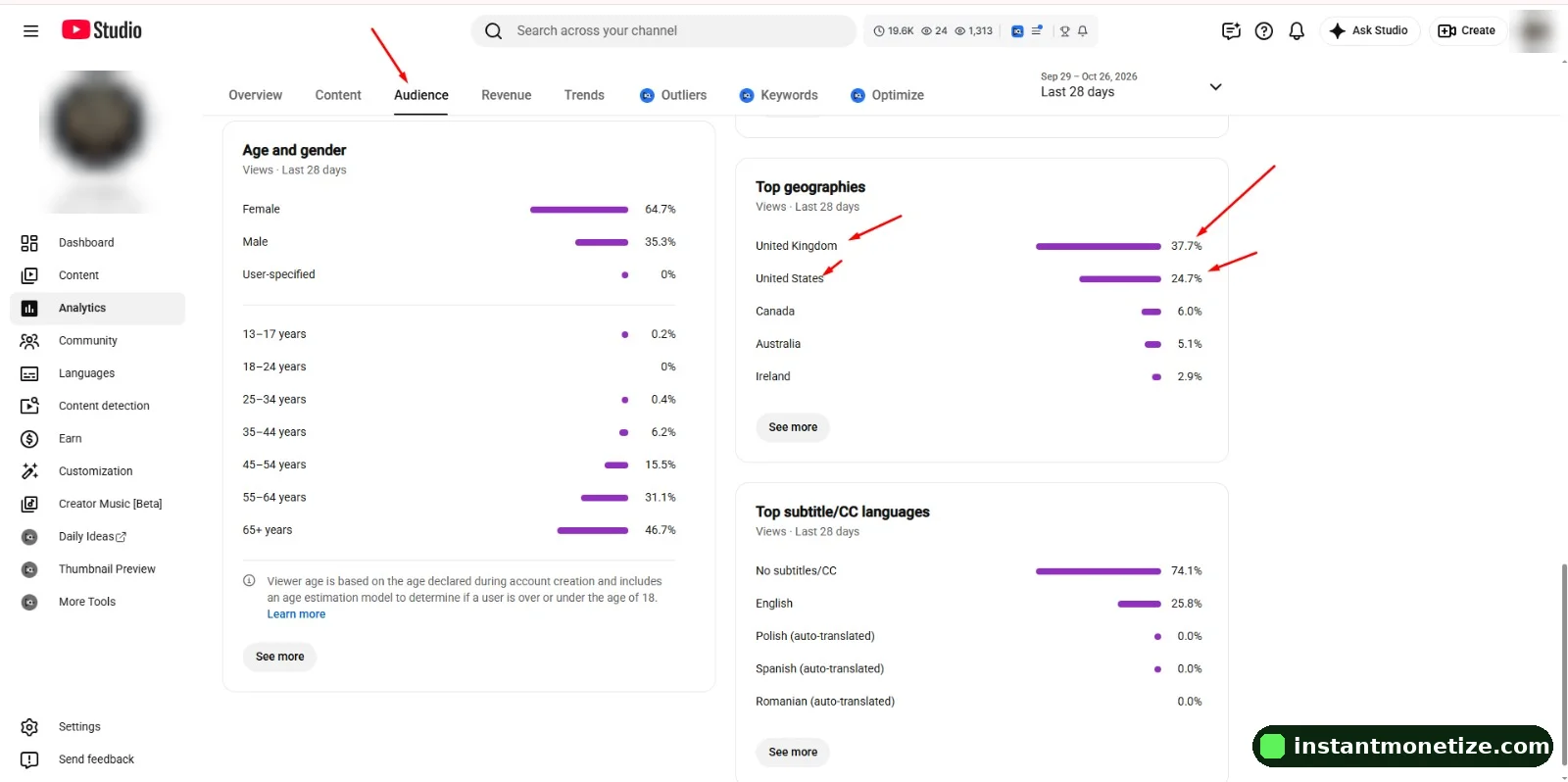
- Open YouTube Studio and click Analytics in the left menu.
- Go to the Audience tab and find the "Top geographies" card. It lists the countries with the most views.
- Change the date range (top right) to Last 28 days, then to Lifetime. Recent data shows the audience the channel has now; Lifetime shows where it came from.
- Click "Advanced mode", then choose Geography as the dimension. You now see views, watch time and, on monetized channels, estimated revenue per country.
- On a monetized channel, open the Revenue tab and note the RPM. A channel with a mostly US or UK audience usually shows a much higher RPM than one with a mostly South Asian audience.
What to ask the seller for
- A live screen share of YouTube Studio, or fresh screenshots that show the channel name, the date range and the full Top geographies card (not cropped).
- Geography for Last 28 days AND Lifetime, so a recent change can't hide an old audience (or the other way round).
- Traffic sources (Analytics → Content → "How viewers find your videos"): a healthy channel gets views from Browse, Suggested and Search, not mostly from "External" links.
- On monetized channels: the Revenue tab with RPM for the last 28 days.
- The niche and language of the videos. An English-language finance or tech channel will usually attract a different audience than a music-compilation channel.
Red flags that the audience isn't what you were told
- The seller only sends a cropped screenshot, or only the subscriber count, never the geography card.
- "US channel" but the Lifetime top geographies are led by countries with very low RPM.
- One country jumps from almost nothing to the top in the last 28 days: often a sign of paid or bot traffic.
- Most views come from "External" or "Direct or unknown" sources instead of Browse, Suggested and Search.
- A high subscriber count but very few views per video and almost no comments.
- The channel's RPM is very low for its niche, even though the seller calls it Western.
Our full list of checks is in how to buy a monetized YouTube channel safely, and the risks of channels pumped with fake traffic are in the risks of buying YouTube subscribers.
What if the audience is mixed?
A mixed audience isn't automatically bad. Many good channels have viewers in several regions. What matters is that the price matches the audience and that you know what you are buying. A channel with a mostly worldwide audience can still be a good start if it is priced as one, and your new videos in English for Western viewers will slowly shift the audience over time.
That is how we price ours: monetized channels with an Asian and worldwide audience are $399.99, and channels with a US, UK and Europe audience are $499.99. Both come with full ownership moved to your Gmail, delivery in 12 to 24 hours and a 30-day replacement or refund.
Can you change a channel's audience after buying?
Yes, gradually. YouTube shows your videos to people who watch similar content. If you post English videos on topics Western viewers search for (finance, software, business, tech reviews), recommend them to that audience, and keep upload times in US or UK hours, the share of Western viewers usually grows over a few months. It won't flip overnight, which is why checking the audience before you pay matters.
Can a seller fake YouTube Studio screenshots?
Screenshots can be edited, which is why a live screen share, or adding you as a viewer or manager before payment, is safer. Ask for the full screen with the date range visible.
Where is "Top geographies" in YouTube Studio?
Analytics → Audience tab → the "Top geographies" card. For more detail use Advanced mode with Geography as the dimension.
Why is my RPM low if my audience is in the US?
Niche, season, video length and how many viewers use ad blockers or YouTube Premium also matter. Shorts pay much less than long videos. But audience country is usually the biggest single factor.
Does the channel owner's country affect earnings?
Not directly. YouTube pays by where viewers watch from. The owner's country affects taxes and payment setup, not the RPM.