Buying a YouTube Channel With AdSense? How You Get Paid

Many listings say "YouTube channel with AdSense for sale". It sounds like you buy the channel and the payout account together. You shouldn't, and on a safe deal you never do. The monetization (the channel's place in the YouTube Partner Program) stays with the channel; the AdSense account is personal and should be yours. Here is how getting paid works after you buy.
Monetization vs AdSense: two different things
| Monetization (YPP) | AdSense for YouTube | |
|---|---|---|
| What it is | The channel's approval to earn from ads | The account that receives the money |
| Belongs to | The channel | A person (one account per person) |
| Moves with the channel? | Yes, it stays with the channel | No, you link your own |
| Where you see it | YouTube Studio → Earn | adsense.google.com |
So when you buy a monetized YouTube channel, what you are really buying is a channel that is already approved to earn. Where the money goes is decided by whichever AdSense account is linked, and you switch that to your own.
Why you should never take over the seller's AdSense
- The money would be paid to the seller's bank details and tax profile, not yours.
- The seller can still log in to AdSense, change payment details or close it.
- Google allows one AdSense account per person, so using someone else's account breaks its rules and can get it disabled.
- Tax forms, identity checks and payment verification are all in the seller's name.
How to link your own AdSense after you buy
- Make sure you are a full owner of the channel first (the seller adds your Google account as an owner of the Brand Account). See how to transfer YouTube channel ownership.
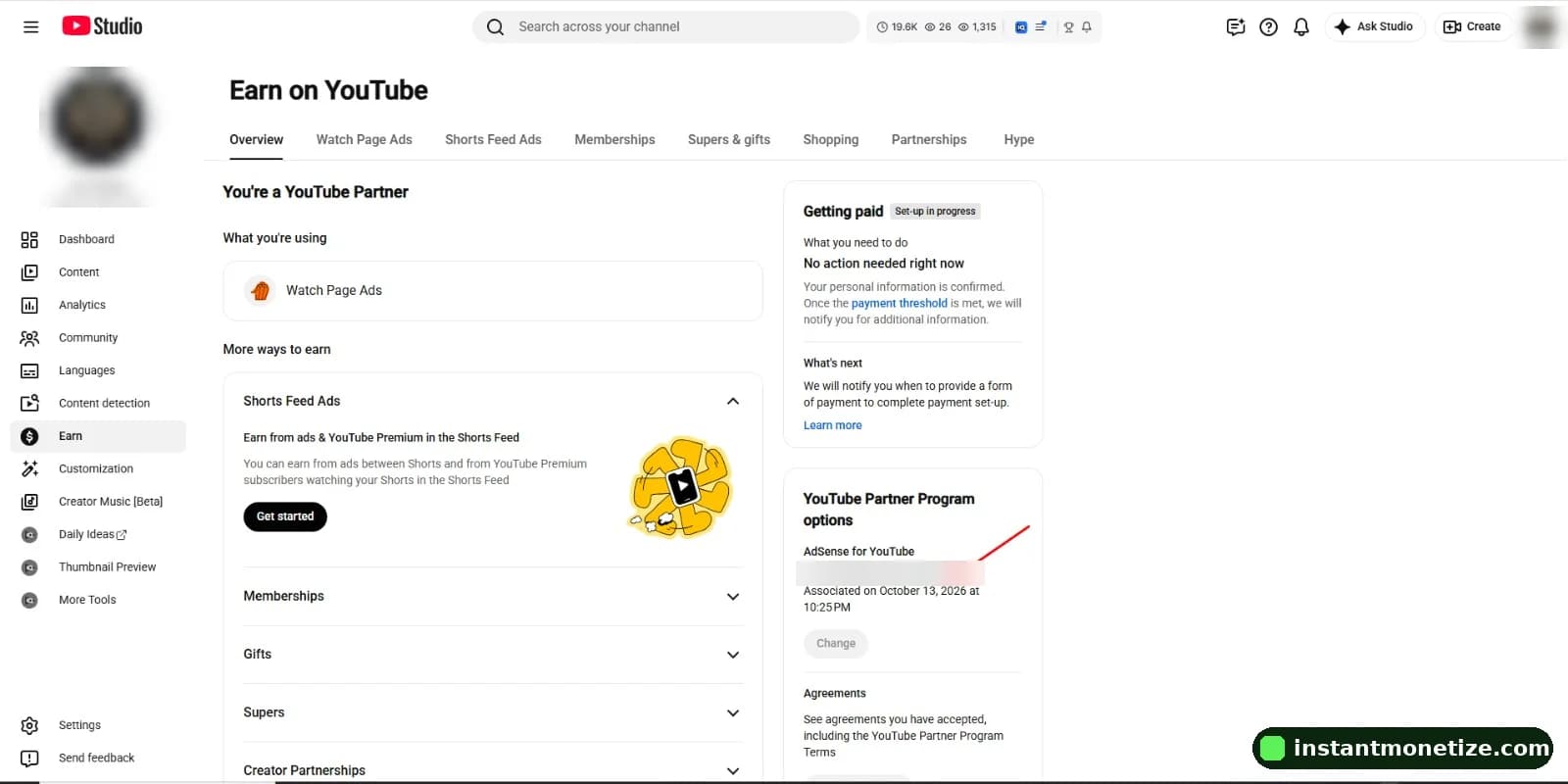
- Sign in to YouTube Studio with your account and open Earn in the left menu.
- Under the YouTube Partner Program options, find the linked AdSense account and select Change.
- Re-enter your password, then link your existing AdSense account or create a new one. Use your own name, address and payment details.
- Check that your channel URL appears under "Your website", then select Accept association.
- Back in YouTube Studio, check your monetization settings.
What to agree with the seller before you pay
- That you get full ownership of the channel (owner on the Brand Account), not just a password.
- That you link your own AdSense right after the transfer, and the seller does not change it back.
- What happens to revenue earned before you switch. Put it in writing so there is no argument later.
- That the channel is in good standing: no active strikes and monetization switched on. Check it live in YouTube Studio.
Our full checklist is in how to buy a monetized YouTube channel safely. If you also want to check where the viewers are before you buy, see how to check a channel's audience country.
How it works with us
We move full ownership to your own Gmail and you link your own AdSense. We never share an AdSense account. Monetized channels are $399.99 (Asian and worldwide audience) or $499.99 (US, UK and Europe audience), delivered within 12 to 24 hours, with a 30-day replacement or refund. You can estimate what a channel could earn with the YouTube money calculator.
Can I buy a YouTube channel with AdSense already approved?
You can buy a channel that is already in the YouTube Partner Program. The AdSense account itself should not be part of the sale: you link your own AdSense for YouTube account after you become the owner.
How often can I change the AdSense account on a YouTube channel?
YouTube lets a monetized channel change its linked AdSense for YouTube account once every 32 days.
Can I link a bought channel to the AdSense account I already have?
Yes. If you already have an AdSense account, you can link it to the channel in YouTube Studio → Earn. Google allows one AdSense account per person, and one account can be used for several channels.
Does changing AdSense remove monetization?
No. Monetization belongs to the channel. Changing the linked AdSense account only changes where future payments go.